


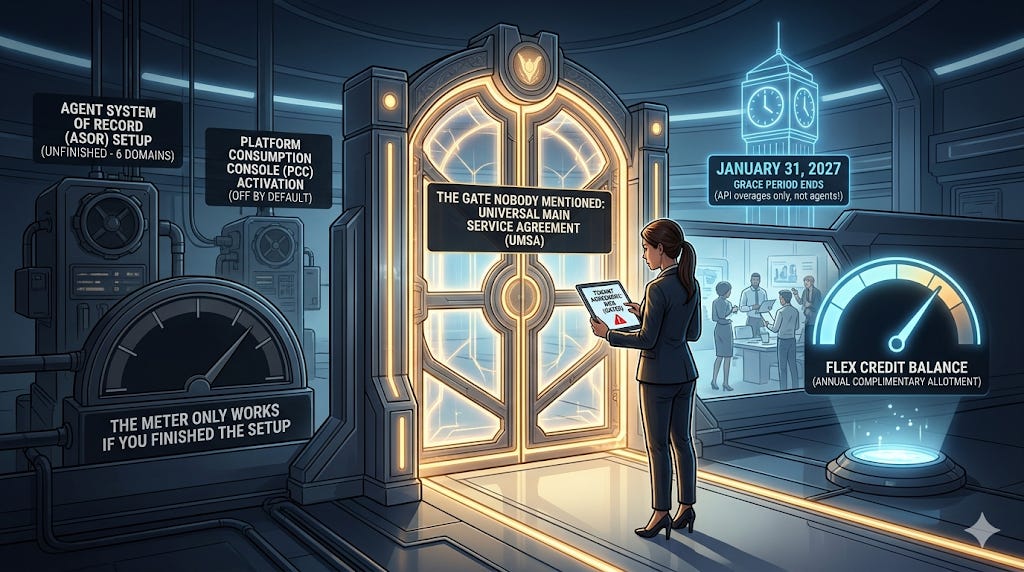
TLDR;
Correction (June 17): An earlier version of this post said signing the UMSA automatically flips Sana Core on in Production and changes your login experience. That's wrong. I went back to the Sana Core for Workday release note: signing provisions Sana Core and drops a security-admin setup task in your tenant — but nothing activates, and no login changes, until an admin completes that task and grants Workspace access. I've corrected the relevant sections below. I'd rather be right than loud. Thanks to the team at Workday for flagging it.
The new Workday Flex Credits and Platform Entitlement Policy took effect May 30, 2026.
The grace period everyone is misreading: from May 30, 2026 through January 31, 2027, policy signers pay no overage charges on Application APIs. That is the whole scope. It does not waive your agent credit burn.
The meter only works if you finished the setup almost nobody finished. Sign the UMSA. Stand up your Agent System of Record. Switch on the Platform Consumption Console.
Signing the policy provisions Sana Core and queues a security-admin setup task. What you do with that task is where the real decision lives.
The rate card is not a price list. It is a map. Some agents are cheap enough to explore all year, some are not.
Credit where it is owed. I would not be writing this piece, and frankly I might not be writing at all, if Jess had not started pulling this thread (and others) in public first (Jess is the absolute boss on working an Agile-led product management Workday team. Read her stuff. It was and still is a major reason why I believe in practitioner-led Workday content). Jess is an HRIS Manager in Minneapolis. A practitioner. Not an analyst, not a vendor voice. What follows builds on a public, on-the-record conversation where she walked through negotiating her own organization’s Workday agreement out loud. That is the rarest kind of source in this space. Not a doc interpretation. A practitioner narrating the actual commercial process while she lived it. The framing here builds on her notes. The modeling is mine.
Let’s go.
1. The gate nobody mentioned
Flex Credits do not exist in a vacuum. You cannot buy them without the Universal Main Subscription Agreement in place first. The UMSA is the master agreement that governs the whole relationship. The Flex Credits and Platform Entitlement Policy sits on top of that structure and governs how the credits are priced and consumed.
So the order matters. The UMSA is the foundation. The Flex Credits policy is the consumption layer that rides on it through your Order Form. If you are evaluating Flex Credits, you are not flipping a standalone switch. You are adding a metered consumption layer to an agreement you already have.
That is worth understanding before you sign, because a consumption policy is an operational decision, not only a commercial one. Ask your account team directly what changes when you sign, including anything that touches access or authentication in Production, and on what schedule. Get the answer in writing. Treat the paperwork and any downstream change as one planned event, and brief security, identity, and the help desk before the pen hits paper, not after.
One clarification, because this is exactly where people get the wrong idea. The UMSA unlocks the use of your entitlements. It does not hand you more Flex Credits. If you want more, or you run past what you have, you sign a Flex Credit Order Form to buy them. And Workday is watching. It monitors your consumption through the PCC and will flag you as you approach your entitlement levels, with a nudge to start looking at purchasing credits before you run out. The gate lets you in. It does not refill the tank.
Here is the asymmetry that catches people. UMSA is required for non-production and production tenants for Workday-built agents. It is not required for non-production tenants for self-built agents. So your sandbox tinkering on a custom agent does not trip the requirement. The moment you take a Workday-native agent toward Production, it does.
Check your own status in about thirty seconds. On Workday Community, open your profile, click your organization name under your title, and read the Subscription Service Agreement value. If it says MSA, you have not opted in and you are gated. If it says UMSA, you are clear and the features are automatically available.
Most practitioners have never looked at that field. Go look.
2. The setup nobody finished
Signing the UMSA opens the door. It does not walk you through it. There are two configuration jobs waiting on the other side, and neither turns on by itself.
Job one: the Agent System of Record.
The ASOR is the control center for your digital agent workforce. Discover agents, register them, manage them, audit them. It is where governance actually lives. And standing it up is a manual security exercise across six domains.
Five live in the new Agent System of Record functional area:
Agent Compliance
Agent Management Hub
Manage: Agents
Reports: Agent Reporting
Setup: Agents
One more lives in the System functional area:
Reports: AI Agent Security
You enable the functional area, activate pending security changes, enable each domain security policy, grant View and Modify to your security groups, then activate again. One caveat that will bite you: today you can only configure unconstrained groups on ASOR security policies. And there is no migration tool. You repeat this in every tenant, by hand. Sandbox, implementation, Production. Each one.
Configure an agent and Workday auto-generates an Agent System User account for it. That ASU is how the agent authenticates. External agents, partner-built or your own, route through the new Agent Gateway on regional endpoints, OAuth 2 only. If you have integrations pointed at old endpoints, that is a migration conversation, not a checkbox.
Job two: the Platform Consumption Console.
The PCC is your meter. It is also off by default. To turn it on, a security admin creates a security policy on the Management Dashboard: Platform Consumption Console domain in the System functional area, adds the relevant security groups, grants View, and activates pending changes.
Two things worth knowing about the PCC. First, Workday is precise that the dashboard data is usage data and not customer content, and that the console itself is not part of the Workday Service. Read that as: it is a courtesy meter, not a contractual one. Second, and this is the one that matters, any customer with a Workday tenant can now turn on the PCC to view document storage. Flex Credits visibility, both complimentary and purchased, is UMSA only.
Six domains for the ASOR. One for the PCC. Seven security configurations standing between you and a working, observable agent stack. None automatic. That is the gap between what is documented and what is real.
3. The task nobody scheduled
Here’s what I got wrong the first time. And here’s what actually happens.
Signing the UMSA does not change your login. It does not flip Sana Core on in Production. Your users are not going to wake up to a new front door.
What it does do: it provisions Sana Core in your tenant and drops a “Set Up AI Admin Security Permissions Task” onto your security admin. Nothing turns on until someone completes that task and adds users to the Sana Workspace.
So the switch doesn’t get thrown automatically. It gets handed to your security admin. Quietly. As a task.
And that’s the part still worth watching. A procurement team signs the paper. A security admin — who may have been in exactly none of those procurement conversations — inherits a config task they didn’t ask for and might not fully understand. If procurement and security aren’t talking (and in most orgs, they aren’t), that task either sits unowned, or it gets rubber-stamped by someone who doesn’t realize what they’re switching on.
That’s not a Monday-morning incident. It’s slower and quieter than that. It’s a configuration decision that lands in an inbox with no context attached. Which, if you’ve done this job long enough, you know is its own kind of dangerous.
4. The rate card, decoded
Now the part everyone wants and almost nobody has modeled.
First, in summary, what you get for free. Complimentary Flex Credits, renewed annually, scaled to company size. Workday sets the actual allotments, so confirm yours with your account team.
The point is not the figure. It is what the figure buys.
Here is the rate card translated into plain practitioner terms. Every one of these is a real consumption meter from the Workday’s published Flex Credit Rate Card*.
*The chart is not the full rate card, just a summary.
The meters are metered in different amounts. A self-service action and a talent rediscovery run are both “one event,” and one costs 1 credit while the other costs 750. That is the whole game.
A credit is not a credit
Take that same 200,000 complimentary allotment from the top tier. Watch what it buys depending on which agent you switch on.
Same pool. Two-hundred-thousand-to-one spread between the cheapest and most expensive thing you can point it at. The complimentary allotment is built to feel abundant, and for low-cost exploratory skills it is. For high-cost skills it is a rounding error.
The sleeper that should scare you
Payroll Data Monitoring. Five credits per 10 worker records per run. That reads as cheap. Do the unit math and it is 0.5 credits per worker, per run.
Run it across a 100,000-worker population, one run is 50,000 credits. Schedule it weekly, the way you would actually run missing-data monitoring, and you are at 2.6 million credits a year against a 200,000 allotment.
You exhaust the entire annual complimentary pool in four runs. The first month.
Even a monthly cadence is 600,000 credits a year. Three times your allotment, from a single agent configuration that a payroll admin could switch on without anyone modeling the cost. This is not a contract negotiation team carefully redlining 400 documents. This is one scheduled job quietly running against your full headcount.
Model the per-worker, per-run skills before you turn them on. Those are the ones that scale with your population, and population is the one number that does not flatter you.
The platform draw nobody connects to agents
The same credit pool covers platform consumption overages. Core Platform API requests bill at 60 credits per 10,000 calls once you exceed your baseline entitlement, which is 6.5 million calls for our analysis (and that floor climbs if you’re running Student, Accounting Center, Procurement, Extend, Prism, or Financial Management — each one raises the baseline).
Go one million calls over baseline and that is 6,000 credits. Ten million over and you are at 60,000 credits, nearly a third of your complimentary allotment, gone to integration traffic that has nothing to do with agents. Modified Workday integrations and non-Workday integrations count toward the limit. Prebuilt unmodified connectors, Built on Workday apps, and traffic between Workday and the acquired platforms like HiredScore and Adaptive do not.
Your agent strategy and your integration architecture draw from the same well. Budget them together or get surprised together. One timing note: this is the one drain the grace period covers. API overages are waived for policy signers through January 31, 2027, which is exactly why you should use the window to find your real API baseline before the meter starts.
The prerequisite tax
A credit balance is necessary, not sufficient. Several agents require an underlying SKU before you can spend a credit on them. The Talent agents are the clearest example. Recruiting, Talent Mobility, and the Fetch skills all require HiredScore AI for Talent. So the most expensive skills on the card, 750 credits a pop, also require a paid SKU underneath them. You pay to unlock the right to burn.
Check the prerequisites doc before you build a business case on any agent. The credit cost isn’t the whole bill.
5. The grace period and your move before January 31
Here is the urgency, and it is the part everyone is about to get wrong.
There is a grace period. It is real, it is published, and it is narrower than the hype will tell you. Per Workday Community (the Simplified Platform Access post, May 2026), customers who have signed or will sign the Flex Credits and Platform Entitlement Policy pay no overage charges on Application APIs from May 30, 2026 through January 31, 2027.
Read that scope twice. Application APIs. Not agents. Not your Flex Credit burn.
So here is what the grace period actually does. If you blow past your Platform Entitlement for API calls while you tune integrations and agent traffic, those API overages are waived through January 31. That is genuinely useful, because Workday just simplified the entitlement model down to APIs only. Document Storage and Integration Events came out of the Platform Entitlement Policy entirely. Document Storage is now a flat 10 terabytes for every customer. APIs are the only metered platform component left, and the grace period gives you room to find your real API baseline before the charges start.
Here is what the grace period does not do. It does not waive your agent consumption. Run the payroll monitoring job from a few sections back, burn 2.6 million Flex Credits against a 200,000 allotment, and that overage is billable today. The grace period does not touch it. Your complimentary credits let you explore agents in production up to your allotment. Past that, the agent meter bills from day one, grace period or not.
The takeaway most people will miss: the free room is on the platform side, where it is easy. The real money is on the agent side, where there is no grace at all.
And the window only helps if you can see your consumption. Which loops back to setup. No UMSA, no credit visibility in the PCC. No PCC, no meter at all. No ASOR, no agents to meter.
Your move, in order:
Check your agreement. MSA or UMSA. Thirty seconds on Community. If you are MSA, start the UMSA opt-in conversation with your account team now, because everything else waits on it.
Brief the auth change before you sign. Know which security admin inherits the setup task — and get them briefed before procurement signs, not after.
Stand up the ASOR. Six domains. Every tenant. No migration. Start in a sandbox so the runbook is solid before Production.
Turn on the PCC. One domain. Confirm you can actually see Flex Credit consumption, which means confirm the UMSA went through.
Know your exposure. Use the window to find two numbers, not one. Your API baseline, which the grace period protects until January 31. And your agent burn, which it never protected. Model the per-worker and per-requisition skills hardest, because those are the ones that scale with your size. Walk into February with both numbers, not a hope.
The grace period is a gift with a deadline and a narrow scope. The scope is the part people will miss.
6. What is permanent and what is noise
You know my thesis. Vendor product names have about a nine-month shelf life. The architecture underneath is the thing worth learning.
The specific rates will change. Workday has signaled that pricing and design-phase skills can move or disappear. So do not memorialize the numbers. Do not build a deck around any singly figure. The rates are a snapshot, and the snapshot has the shortest shelf life of anything here.
What is permanent is the shape. Workday moved from buy-a-SKU-get-unlimited-use to metered consumption, where you pay for the work the agent performs and the meters are denominated in wildly different units. That model is not going back in the box. The names will churn. Sana, Illuminate, whatever comes next. The consumption architecture is the new floor for the agent and platform layer — to be clear, this is the model for the AI/agent SKUs, not your whole Workday footprint. Most of the platform still works the old way.
Learn the floor. Use the window to learn it with real data instead of marketing math, and learn both numbers: the API baseline the grace period protects, and the agent burn. The clock started May 30. It stops January 31.
And before you click the X in the upper right of your screen, open a new browser tab and go look at your agreement field.
- Mike.
Special thanks to Jess for reading the meter out loud before the rest of us thought to look. Notes, modeling, and any errors here are mine.